|
A. The Basics
1. Understanding World Instances
2. Creating Your Character
3. Moving Your Character
4. Managing Your Character
5. Stats, Skills & Gaining Levels
6. Interacting With Game Objects
7. Magic
8. The Action Bar
9. Currency, Vendors & Banking
10. Quests
11. Time System & Blood Moons
12. Death
13. Game Menu and Options
14. Using The Compass
15. Riding a Mount
16. Fast Travel/Star Stones
17. Creature & Item Spawning
18. Work Orders/Apprenticeships
B. Housing / Properties
E. Quest Walkthrough
Got questions, ask here! Join Discord Join Discord
|
Building / Placing Architecture PlansYou can build an architecture plan on a property area you own by double clicking on the plan and then positioning your cursor so the previewed house is displayed fully over the highlighted property area. Once you have the plan positioned, simply left click to complete the placement. 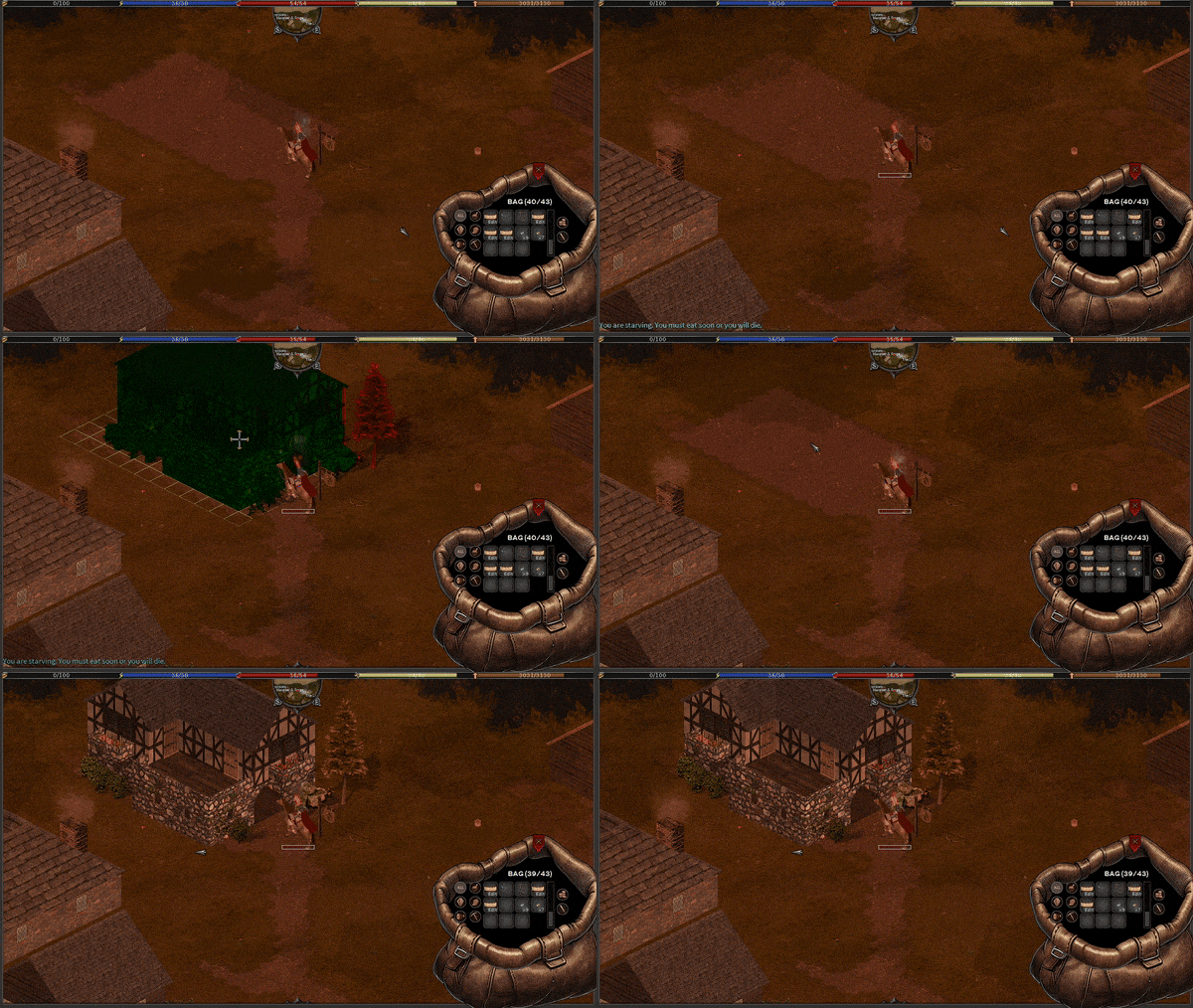
You should always walk your plans and look for any issues with the design prior to furnishing. Currently a plan must be collapsed to edit it which means furnishings need to be removed/repositioned between editing so its easier to catch problems up front. Eventually we plan to have in place editing but that is not available at this time. For more information on collapsing a structure back to a plan see that section in the manual. |